
How to Find Users for Your SaaS
Learn how to find users for your SaaS by spotting real buyer intent on Reddit, X, LinkedIn, and niche communities - with search queries, examples, and a repeatable manual-to-automated workflow.
Quick Answer
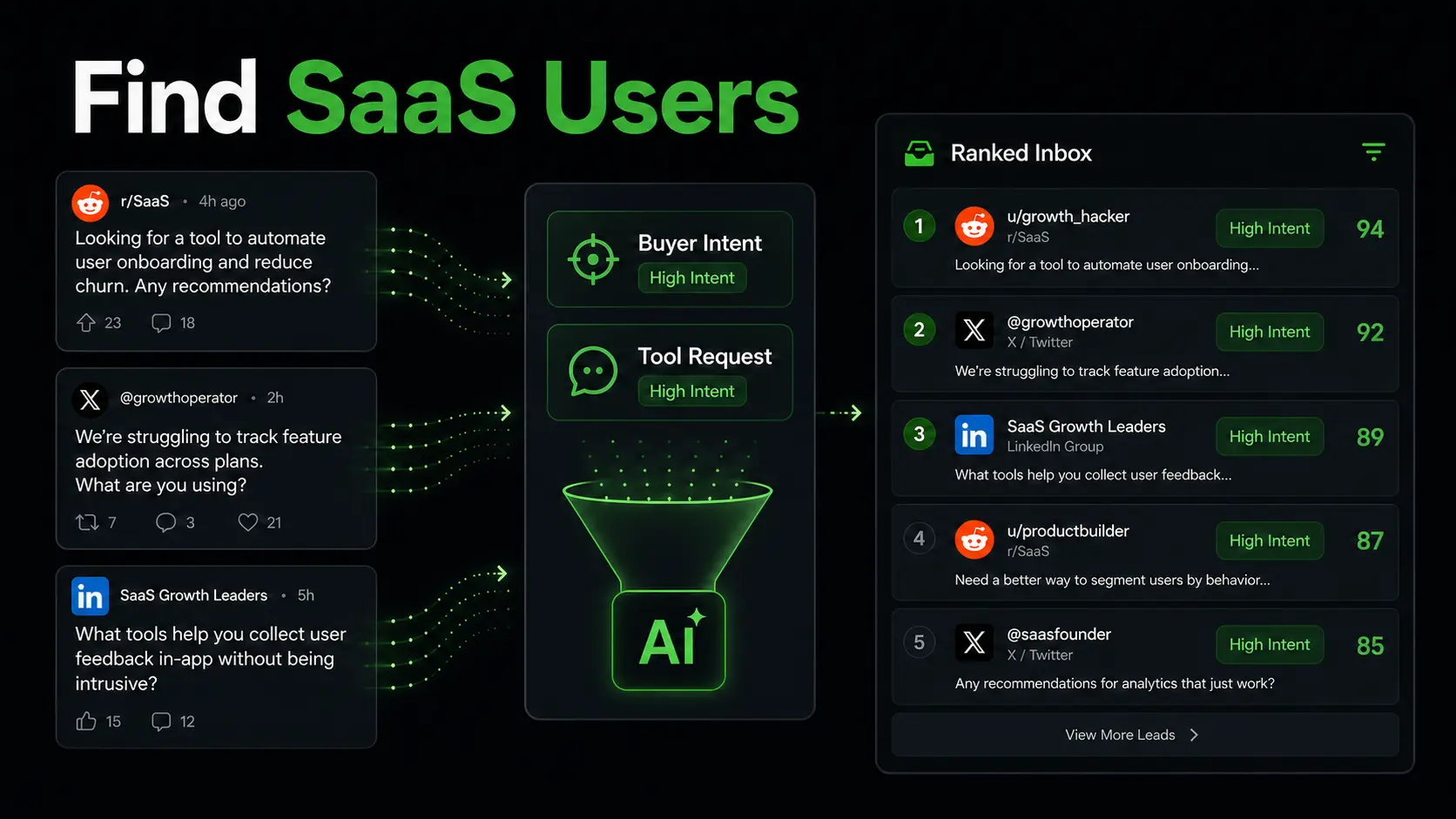
The fastest way to find users for your SaaS is to stop looking only for traffic and start looking for intent. Find people who are already asking for a tool, complaining about a workflow, comparing alternatives, or trying to fix the exact problem your product solves.
Leadverse automates this by scanning Reddit, X, LinkedIn, and supported public/community sources for posts where people are already asking for tools, alternatives, services, workflows, and fixes - then filtering noise and ranking the strongest matches.
First 10 Users vs First 100 Users
Finding your first 10 users is not the same job as finding your first 100 users.
The first 10 are mostly about learning. You want people with enough pain to try something unfinished, explain what they were doing before, and tell you what would make the product useful. The first 100 are about repeatability. You need a source of similar conversations, a clear reply pattern, and enough volume to see which pain points convert.
That is why generic launch advice often disappoints founders. Product Hunt, directories, newsletters, and founder communities can create attention, but they rarely tell you who has a current problem. Public intent posts do.
| Goal | What to optimize for | Best source of users |
|---|---|---|
| First 10 users | Learning, calls, onboarding feedback | High-pain posts and direct conversations |
| First 100 users | Repeatable acquisition and activation | A steady inbox of similar intent signals |
| Beyond 100 users | Scalable channels and conversion systems | SEO, partnerships, paid, lifecycle, and automated intent monitoring |
A 7-Day SaaS User-Finding Sprint
If you are starting from zero, run a focused sprint instead of vaguely posting everywhere.
- Day 1: Write down the painful workflow your SaaS removes and the exact words users use to describe it.
- Day 2: List competitors, manual alternatives, spreadsheets, templates, and services users currently rely on.
- Day 3: Search Reddit, X, LinkedIn, and niche communities for problem phrases and competitor alternatives.
- Day 4: Save 30 to 50 posts and tag each one by pain, urgency, role, and current workaround.
- Day 5: Reply to the 10 strongest posts with useful advice and no hard pitch.
- Day 6: DM or follow up only where the person showed curiosity, asked for help, or requested a tool.
- Day 7: Review which pain points produced replies, signups, calls, or useful objections.
By the end of the sprint, you should know which phrasing produces real conversations. That is more useful than a one-day launch spike with no feedback loop.
Pre-Product, Beta, and Post-Launch Workflows
The right outreach changes depending on how mature your SaaS is.
| Stage | What to look for | Best ask |
|---|---|---|
| Pre-product | People describing the pain or current workaround | Ask for a short call or permission to learn more |
| Beta | People asking for tools, alternatives, or fixes | Offer early access if the use case matches |
| Post-launch | People comparing tools or looking to switch | Send a relevant link after they ask for more |
Pre-product users are not always ready to sign up, but they can teach you the words that sell. Beta users need a clear reason to tolerate rough edges. Post-launch users need proof that the product solves their specific workflow.
Where SaaS User Conversations Happen
Start with platforms where users naturally describe problems in their own words: Reddit, X, LinkedIn comments, Indie Hackers, niche Slack or Discord groups, product communities, and industry forums.
Search by the problem, not just the category. If your SaaS helps agencies report client results, search for phrases like "client reporting takes too long" or "weekly reporting spreadsheet" instead of only "agency software."
You can also test this workflow with the free Reddit lead finder and X lead finder, or browse a live, weekly-updated feed of people looking for lead gen tools on Reddit.
How to Score SaaS User Conversations
Do not treat every mention of your category as a lead. Score each conversation before replying.
- Pain: they describe a repeated manual task, wasted time, lost money, or broken workflow.
- Fit: the role, company type, or use case matches who your SaaS is built for.
- Timing: the post is recent and the person sounds like they are still looking.
- Current workaround: they mention spreadsheets, scripts, agencies, templates, or a competitor.
- Action: they ask for a tool, recommendation, alternative, fix, or workflow.
| Post | Lead Quality | Why |
|---|---|---|
| "Is there a tool that can automate weekly client reports?" | High | Clear tool request |
| "Any cheaper alternatives to [competitor]?" | High | Active alternative search |
| "I am tired of doing this manually in spreadsheets" | High | Pain and workaround |
| "How do you all manage this workflow?" | Medium | Workflow need, but may need qualification |
| "We just launched our new SaaS" | None | They are selling, not buying |
| "Roast my landing page" | Low | Feedback request, not user intent |
A strong SaaS user opportunity usually has at least three of those signals. A weak one only shares a keyword with your product.
Exact Search Queries to Find SaaS Users
Build your first search list from phrases people use before they know your product exists.
"is there a tool for"
"looking for software to"
"recommend a tool for"
"alternative to [competitor]"
"cheaper alternative to [competitor]"
"tired of manually"
"how do I automate"
"best way to manage"
"anyone know an app that"
"switching from [competitor]"
"tool for [workflow]"
"software for [specific role]"
"site:reddit.com [problem phrase]"
"site:reddit.com [competitor] alternative"
Replace the bracketed terms with the workflow, competitor, role, or pain your SaaS addresses. Search recent results first, then save the phrases that produce real conversations.
Good vs Bad SaaS User Opportunities
| Example Post | Intent | Should You Reply? | Why |
|---|---|---|---|
| "Looking for a simple tool to track customer onboarding tasks" | Tool request | Yes | Specific need and category |
| "Any alternative to [competitor] that is less expensive?" | Alternative search | Yes | Existing product awareness and switching intent |
| "I spend every Friday copying numbers into reports" | Pain/frustration | Yes | Manual workflow with clear cost |
| "What is the best CRM?" | Broad research | Maybe | Too generic unless your niche matches |
| "I launched a new CRM for agencies" | Promo | No | They are promoting their own product |
| "Can someone review my SaaS landing page?" | Feedback | No | They want critique, not a solution |
Strong posts usually mention a workflow, competitor, manual task, budget pressure, deadline, or failed solution. Weak posts only mention your category or ask for general opinions.
Why Manual Searching Does Not Scale
Manual searching is useful when you are learning the market, but it gets fragile quickly.
Common problems:
- fresh posts are easy to miss
- keyword alerts create too much noise
- broad category searches return low-intent content
- the same person may post across multiple platforms
- it is hard to rank posts by urgency and fit
- checking every source every day takes too much time
For a founder, the goal is not another search habit. The goal is a reliable inbox of conversations worth joining.
Find SaaS users from real buying-intent posts
Leadverse monitors Reddit, X, LinkedIn, and supported public sources for people asking for tools, alternatives, workflows, and fixes.
No charge today - Cancel anytime
How Leadverse Automates This
Leadverse turns this workflow into a ranked lead inbox. You describe the type of users you want to find, then Leadverse monitors Reddit, X, LinkedIn, and supported public/community sources for posts that match your campaign.
For example:
Find SaaS founders, marketers, and agencies asking for tools that automate client reporting, replace spreadsheets, or provide alternatives to reporting dashboards.
Leadverse then:
- scans public conversations for relevant posts
- filters out launch and promo noise
- detects tool requests, alternatives, pain, and workflow needs
- scores each post by intent and fit
- shows strong and partial matches in one inbox
- helps you reply while the conversation is still fresh
- supports outreach workflows where the first message starts a conversation instead of dropping a link
You can start from Leadverse if you want to find people already asking for exactly what you sell.
When to Ask for a Call vs Send a Signup Link
Not every interested person should get the same next step. The right ask depends on the stage of your product and the clarity of their intent.
| Situation | Best next step | Why |
|---|---|---|
| They describe a painful workflow but do not ask for software | Ask one or two diagnostic questions | You need to confirm the use case before pitching |
| They ask for a tool or alternative that matches your SaaS | Offer to share the link after they reply | The product is relevant, but permission still improves replies |
| They are a perfect-fit beta user with a complex workflow | Ask for a short call | A call gives you onboarding feedback and product language |
| They want a quick fix and your product is self-serve | Send the signup link after curiosity is established | They are ready for a direct path |
| They are browsing broadly with no urgency | Answer publicly and move on | Low urgency conversations can drain time |
Early SaaS founders often send links too early. A better rule is: ask for a call when you still need learning, send a link when the person has already shown clear product intent.
How to Reply Without Sounding Spammy
Lead with the answer, not the pitch. A useful reply should stand on its own even if the person never tries your product.
Bad reply:
We built this. Sign up here.
Better reply:
You can solve this manually with a spreadsheet and scheduled reminders, but it usually breaks once multiple people own the workflow. I would first map who needs to update each step, then automate only the recurring status checks.
Then mention your product only if it clearly fits:
I am building a tool for this exact workflow. Happy to share it if you want to compare it with the manual setup.
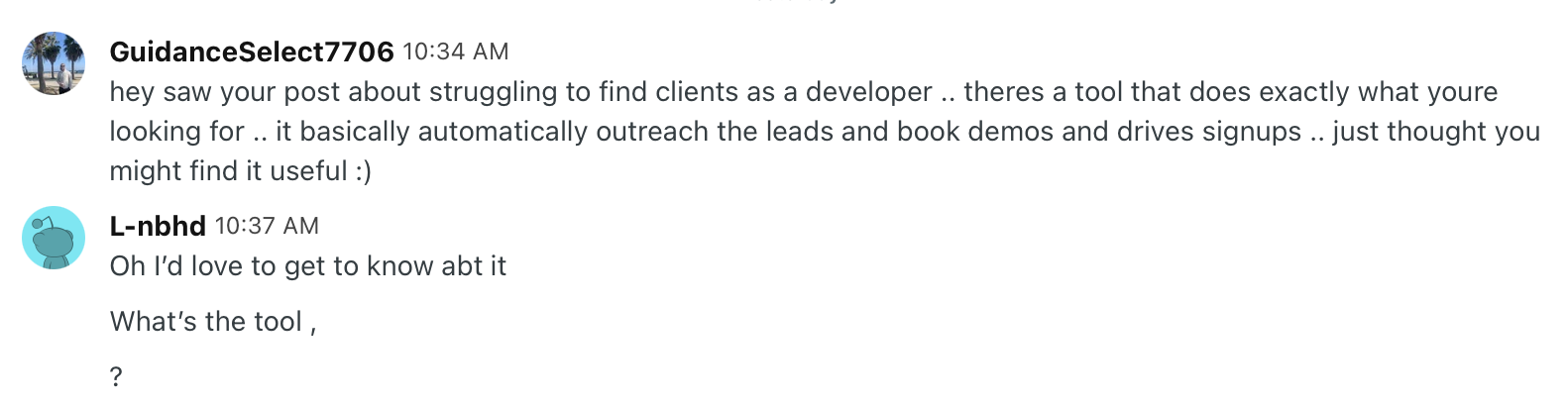
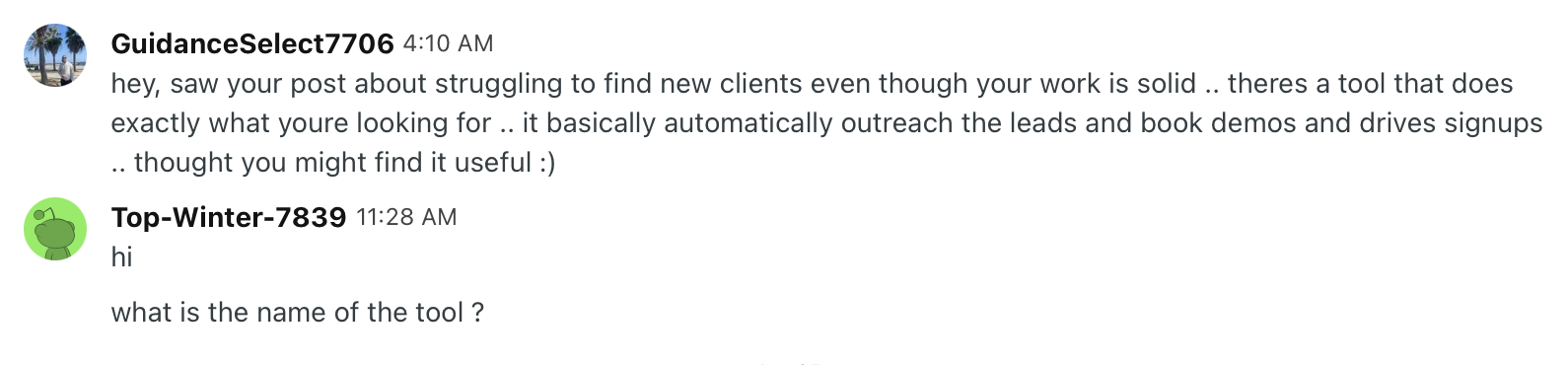
For Reddit DMs, a stronger pattern is to avoid links in the first message. Make the first DM about their post and create curiosity:
Hey, saw your post about X. There is actually a tool that does exactly that...
Then stop. Do not include the product link yet. Wait for them to reply and ask what tool you mean, then send the link, explain the product, or offer more context.
This works because the first message feels like a relevant answer to their post, not a cold pitch. In Leadverse outreach, this link-after-reply approach has produced 40%+ reply rates, while direct first-message pitches usually perform worse.
Reddit DM sequence examples
These real Reddit DM screenshots show the pattern in practice: the first message creates curiosity, the lead asks for more, and the link or pitch comes after the reply. This is the kind of outreach sequence Leadverse can help automate once you know which intent signals to target.

What to Measure After You Find Users
Do not stop at replies or signups. Track whether the people you find actually activate.
- Which search phrase found the user?
- Which platform produced the conversation?
- What pain did they describe?
- Did they sign up, book a call, or ask a follow-up question?
- Did they reach the product activation event?
- What objection stopped them?
This helps you separate acquisition channels from acquisition lessons. The best early-user search process should improve your product positioning, not only your signup count.
FAQ
Final Thoughts
Getting SaaS users is not only a distribution problem. It is an intent problem.
The best early users are already describing the pain your product solves. Your job is to find those conversations early, reply with something useful, and turn the strongest signals into a repeatable acquisition workflow.
Broad launches can still help. But if you want practical learning and warmer users, start with people already asking for tools, alternatives, workflows, and fixes.